
Service
Application & Workload Migration
Rehost or replatform applications, databases and infrastructure with controlled migration waves.

Move applications without turning every migration into a rewrite
Not every workload needs to be rebuilt before it can move.
We rehost and replatform applications, databases and supporting infrastructure in controlled migration waves, preserving business functionality while making the changes needed for the target environment.
Typical scenarios:
Applications need a new hosting platform – move workloads without unnecessary redesign.
Legacy infrastructure is becoming difficult to operate – migrate to supported and more manageable platforms.
Databases need a new target – move data while controlling consistency, downtime and application dependencies.
A larger migration program needs execution capacity – migrate workload groups through repeatable, tested waves.
How does Application & Workload Migration work?
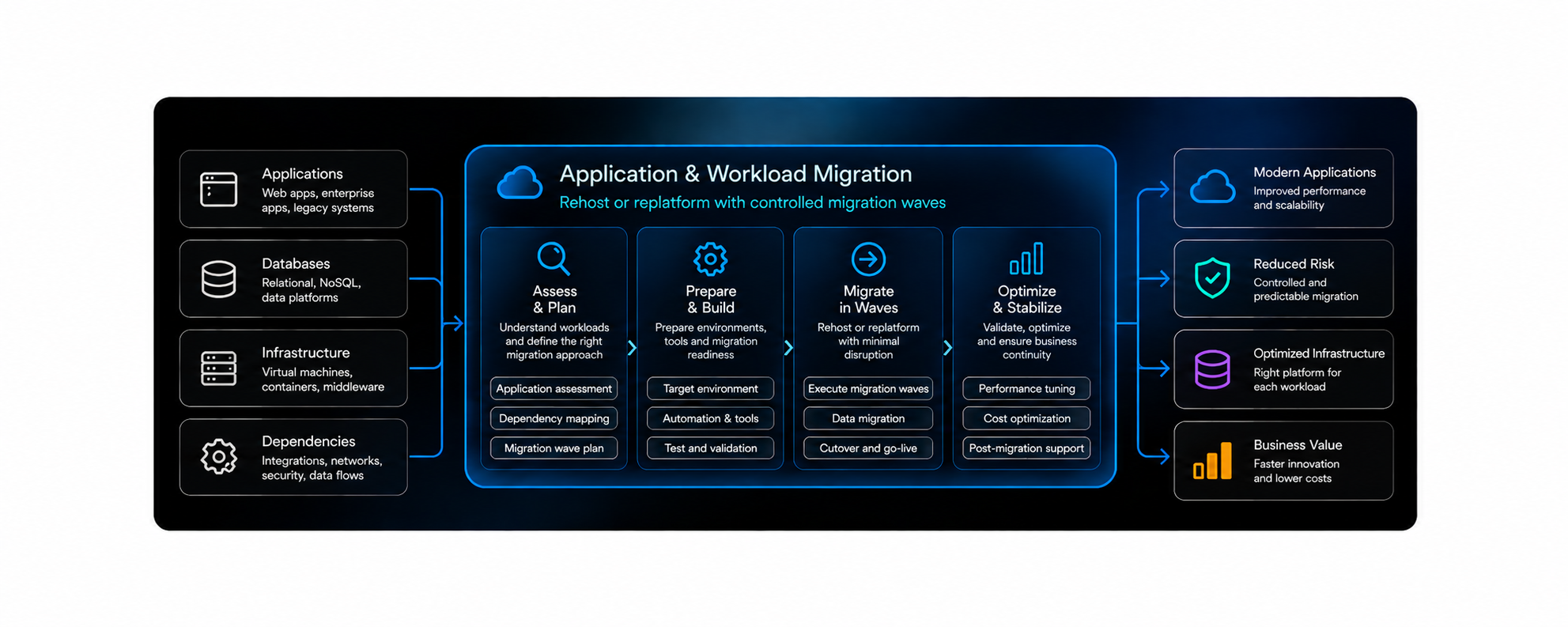
We treat each application as a complete workload, migrate its dependent components together and validate functionality, performance and operations before production cutover.
What does a workload migration include?
An application rarely consists of one server. A workload can include compute, databases, storage, middleware, network dependencies, external integrations and operational processes. Successful migration moves these components as one working service.
Choose the right level of change for each workload
Migration does not have to mean either “lift everything unchanged” or “rewrite everything for cloud.”
We choose the migration pattern based on business deadlines, technical condition, target platform and the value of changing the workload during the move.
We provide:
Rehost and relocate migrations
Application and database replatforming
Migration wave execution and testing
Cutover, rollback and operational handover

Benefits of Application & Workload Migration
Frequently Asked Questions
What is an application or workload migration?
A workload migration moves an application and the infrastructure it depends on to a new environment.
Depending on the system, this can include virtual machines, databases, storage, middleware, networking, identity, integrations and operational tooling.
The destination can be public cloud, private cloud, another cloud provider or another supported infrastructure platform.
What is the difference between rehost and replatform?
Rehost moves the workload with minimal architectural change. For example, an application running on virtual machines may move to equivalent cloud virtual machines.
Replatform makes limited changes during the move to use a more suitable target service. For example, a self-managed database may move to a managed database platform.
Microsoft describes rehost as the lower-change option, while replatform introduces selected platform improvements without requiring a full application rewrite.
Should we rehost or replatform our applications?
It depends on the workload and migration objective.
Rehosting is often appropriate when speed, low change and a fixed deadline are the priority.
Replatforming can make sense when a component is outdated, expensive to operate or can move to a managed service with limited application changes.
We avoid replatforming simply because a cloud-native service exists. The expected operational or business benefit should justify the additional migration work.
Do you migrate databases together with applications?
Yes.
Applications and databases are often tightly connected, so their migration approach and cutover sequence need to be designed together.
Depending on the database and target, we can use replication, backup and restore, native migration tools or continuous data synchronization.
Before cutover, we validate data consistency and confirm that dependent applications can use the target database correctly. AWS also stresses that database synchronization and application dependencies can materially increase cutover complexity.
How are migration waves created?
We group workloads based on technical dependencies, business criticality, complexity, common migration patterns and delivery capacity.
Applications that communicate closely or depend on shared databases and services may need to move in the same wave.
Independent workloads can be migrated separately or in parallel where the risk is acceptable.
Azure’s current wave-planning model follows the same approach, grouping applications around dependencies and business requirements, then sequencing them by criticality, complexity and migration impact.
How do you test an application before cutover?
We validate more than whether the application starts.
Testing can include application functionality, integrations, database access, performance, security, monitoring, backup and operational processes.
Where possible, the target workload is deployed and tested before production traffic is redirected.
Microsoft specifically recommends validating functionality and securing and automating the target workload before production cutover.
What happens if the migration fails during cutover?
Critical workload migrations should have predefined success and rollback criteria.
Before cutover, we document checkpoints, decision owners and the technical steps required to either continue, fix forward or return traffic to the source environment.
For stateful applications, data changes after cutover need special attention because rollback can be more complex once the target has accepted new transactions. AWS recommends defining rollback triggers and data-handling strategy before the cutover starts.
When should an application be modernized instead of migrated?
If the workload has fundamental architecture, reliability or maintainability problems, simply moving it can carry those problems into the new environment.
In that case, we may recommend replatforming selected components or separating migration from a later modernization phase.
Microsoft explicitly warns that rehosting does not fix existing performance, reliability or architecture problems, while AWS recommends avoiding large-scale refactoring inside a migration program when it introduces too much delivery complexity.
For deeper redesign, the workload moves into our Legacy Modernization services rather than expanding the migration indefinitely.
Turn your Technology Challenge into a clear Delivery Plan
Nubes Consulting Digital helps design, modernize and operate complex technology environments. From Cloud and Architecture to DevOps, SRE and Engineering Delivery, we focus on practical decisions, reliable execution and measurable business outcomes.
